









How to Play CS 1.6 in VR: Step-by-Step Installation Guide

Counter-Strike 1.6 may have just got its most significant update since its 2003 launch with CSVR, a mod that transforms the classic FPS into a VR experience.
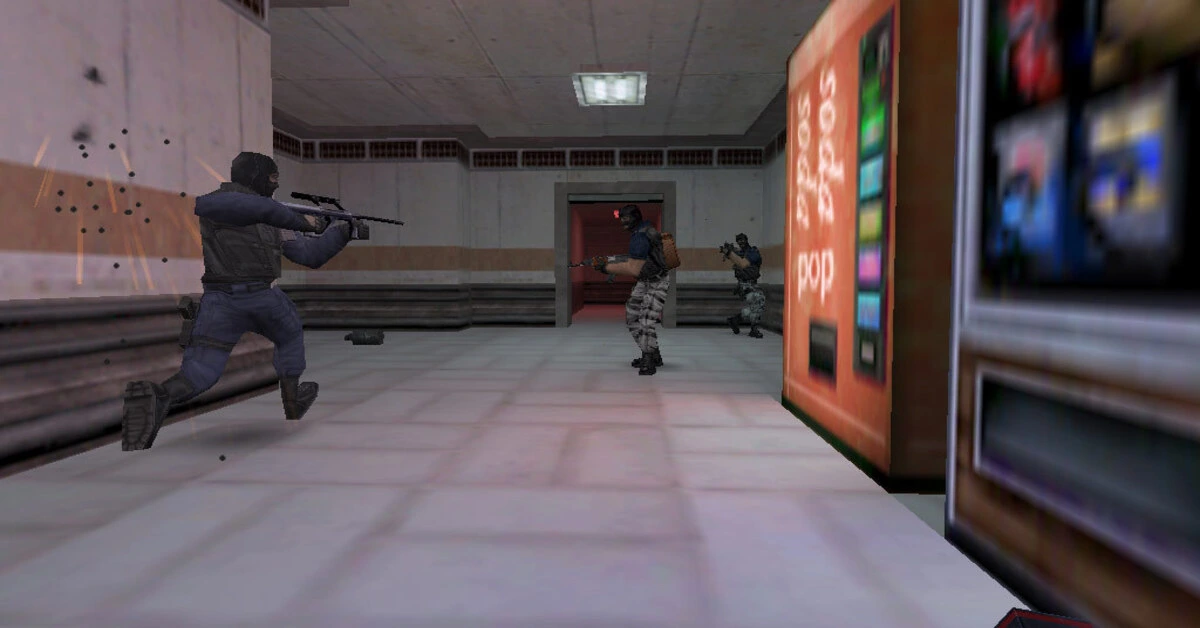
The CSVR mod, developed by the legendary Team Beef, the team behind the DOOM and Half-Life VR mods, is a full conversion of the original Counter-Strike 1.6 assets for native VR play.
Unlike previous PC-tethered attempts, this version runs directly on your headset’s hardware. It supports the Meta Quest 3, Quest 2, and Pico 4 Ultra.
By leveraging the Xash3D engine, the mod recreates the exact physics and movement of 1.6 while adding 6DoF (Six Degrees of Freedom) tracking. This means you aren’t just clicking heads; you are physically leaning around corners in Aztec and Italy.
👉 READ ALSO: Half-Life 3 Now Playable, According to Leaker
CSVR vs Traditional PC Gaming
The transition from mouse and keyboard to VR changes the high-stakes gameplay of Counter-Strike. In the original 1.6, success relied on “crosshair placement” and “recoil patterns.” In CSVR, it relies on your actual physical stance and arm steadiness.
- Physical Reloading: No more pressing “R.” You must manually swap magazines and rack the slide under pressure.
- Decoupled Aiming: Look one way, shoot another. This adds a layer of tactical depth impossible on a flat screen.
- Lower Barrier to Entry: You don’t need a high-end gaming rig. If you have a standalone headset and own the original game on Steam, you can play.
While the skill ceiling remains astronomical, the immersion of hearing a flashbang ring in your ears while physically shielding your eyes is a completely new way to playthe FPS.
How to Download and Install CSVR via SideQuest
Installing the CSVR mod through the official SideQuest link is a straightforward process, but you must have your own copy of the original game files. This is a port, not a free standalone game, so your Steam files are the “key” to playing.
Phase 1: Establish the Connection
- 1. Developer Mode: Ensure your Meta Quest or Pico headset has Developer Mode enabled via the mobile app.
- 2. SideQuest Desktop: Download the SideQuest Advanced Installer on your PC.
- 3. The Link: Navigate to the [CSVR SideQuest page](https://sidequestvr.com/app/45868/csvr) and click “Sideload to Headset” while your device is connected via USB-C.
Phase 2: Transferring Steam Assets
- Locate Original Files: Go to your Steam library on your PC, right-click Counter-Strike 1.6 > Manage > Browse Local Files.
- Identify Folders: You are looking for two specific folders: `cstrike` and `valve`.
- The Migration: Use the SideQuest File Manager (the folder icon in the top bar) to navigate to the `/xash/` directory on your headset.
- Copy & Paste: Drag the `cstrike` and `valve` folders from your PC into that `/xash/` folder on the headset.
Phase 3: Launch and Play
Once the transfer hits 100%, put on your headset. Head to your App Library, select the search/filter bar, and choose
“Unknown Sources.” Click on CSVR to boot into the game. If the files were moved correctly, you will see the classic Sierra-era menu screen, now floating in a 3D space.
Keep in mind that while the base mod is free on SideQuest, the developers at Team Beef often release optimized updates and early-access features for their Patreon supporters first.
For those who want the absolute latest features, Team Beef often releases “Bleeding Edge” builds via their Patreon. These versions typically include experimental fixes for the Meta Quest 3 and Pico 4 Ultra before they hit the public SideQuest repository.
Is Counter-Strike 1.6 VR Worth It?
For anyone who spent their teenage years in internet cafes, CSVR is an essential experience. It isn’t just a gimmick, but a high-performance competitive shooter that proves the 25-year-old GoldSrc engine still has teeth. The mod is currently available via SideQuest for those who support Team Beef’s development, requiring a legal copy of CS 1.6 to run.
Do you think you can still land those Desert Eagle headshots when you have to aim with your actual hands?
Fueled by a passion for gaming and the ever-evolving world of gaming news, Daniel loves connecting with seasoned and new players to bring games to life on the page, exploring their narratives and gaming trends. A self-published fiction and fantasy author, Daniel has nearly 20 years of experience writing gaming news and a love for storytelling that drives his enthusiasm to deliver breaking news, in-depth analysis, and industry innovations. You will find him in-game as "Windfell."
Download the Allkeyshop Browser Extension Free
For all the latest video game news, trailers, and best deals, make sure to bookmark us.
You can find all the best and cheapest online deals on CD keys, game codes, gift cards, and antivirus software from the verified CD key sellers on our store pages.
To not miss any news on Allkeyshop, subscribe on
Google News
.
MORE RELEVANT ARTICLES




Comments (0)