










![Project Motor Racing 2.0 Drops With Massive Overhaul & Clean Lobbies [Patch]](https://www.allkeyshop.com/blog/wp-content/uploads/featured-project-motor-racing-update-2.0-launch-details-featured-fixes-community-feedback-172x90.webp)

Top 3: Graphics Highlights Q1 2026 – Can Your GPU Handle the New AAA Benchmarks?

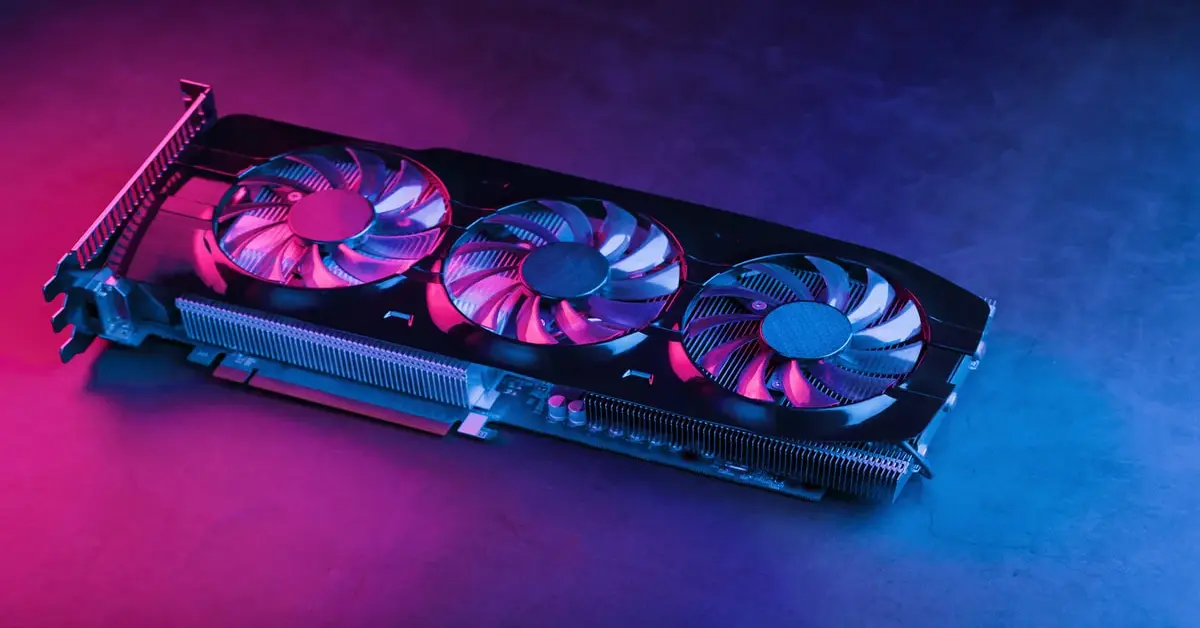
In the first quarter of 2026, several technically demanding AAA games were released. These titles focus on ray tracing, large worlds, and new engine features. All of these features require a lot of graphics power. As a result, overall hardware requirements are increasing. VRAM is becoming more important and upscaling is now standard. If you want games to look good today and fully showcase their visual quality, you need serious performance. That is why we are showing the 3 most demanding graphics games from Q1. The question is, is your GPU still enough for modern games?
#1: Crimson Desert – Next Gen Open World Benchmark
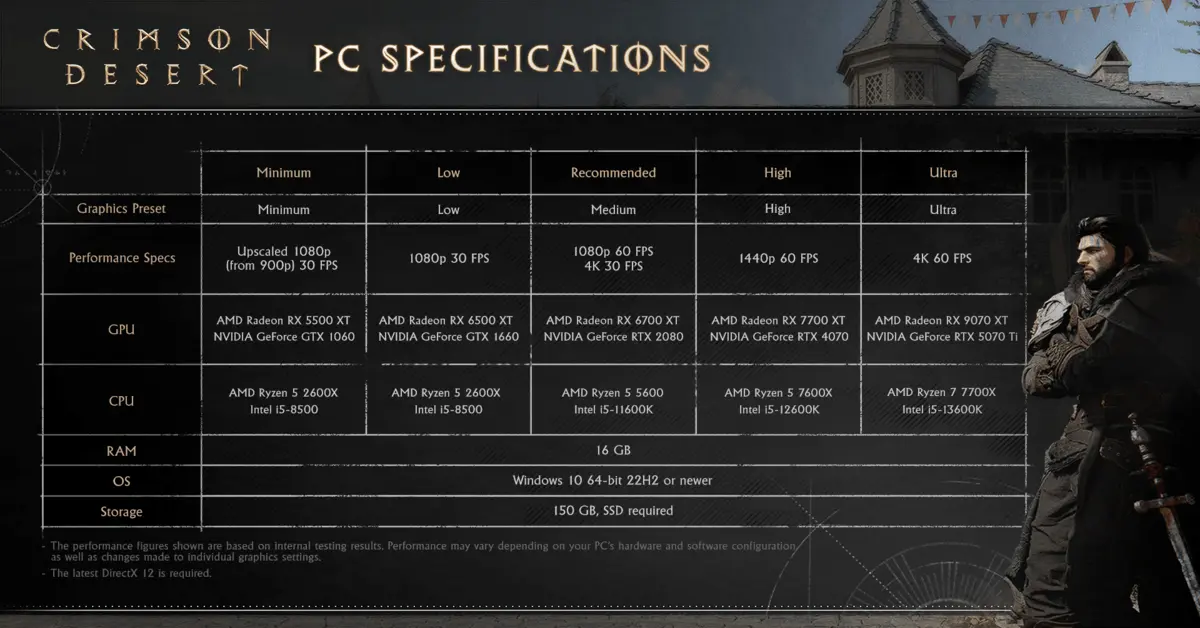
We start with the open world RPG Crimson Desert. On the highest settings, the game offers an extremely high draw distance. On top of that, there is dynamic weather and a complex physics system. This results in a combination of GPU and CPU stress. The game features many highly detailed NPCs and large scale battles with many of them at once. However, the main load comes from lighting, particles, and effects.
DLSS and FSR, meaning upscaling, are required for stable performance. Even in cities, many older graphics cards struggle due to the level of detail. This makes Crimson Desert one of the most complete hardware stress tests right now. The recommended system requirements list an RTX 2080, but that is not enough for 4K at 60 FPS. To achieve that level of graphics, you need at least an RTX 5070 Ti combined with a Ryzen 7 7700X or Intel i5 13600K. You can see more in the table.
#2: Resident Evil Requiem – Ray Tracing and Lighting Showcase
About a month ago, the latest game in the Resident Evil series, Requiem, was released. This survival horror title focuses on next gen lighting and atmosphere. Ray tracing is required for these shadows and lighting effects, which also makes reflections look extremely realistic. The game also features very detailed interiors. With multiple light sources and effects, GPU load becomes very high. The textures are especially VRAM intensive, so you definitely need a modern graphics card for higher settings.
With upscaling, almost any graphics card can reach 60 FPS at Full HD. For 1440p, you should have an RTX 3060 Ti, RTX 4060 Ti, RTX 5060, RX 7700 XT, or RX 9060 XT. For 4K, you need at least an RTX 4070, RX 7900 XT, or RX 9070, and the game will run smoothly without issues.
The real requirements come when you enable ray tracing. For 1080p with high ray tracing, you already need an RX 9060 XT, RTX 5060 Ti, or RTX 4070 for at least 60 FPS. For 1440p, you need an RTX 5070 or RTX 4070 Ti from Nvidia or AMD’s RX 7900 XTX and RX 9070 series. For 4K with ray tracing, you need an RTX 5090 for 60 FPS, while an RTX 5080 only reaches around 48 FPS.
As mentioned before, VRAM requirements are also quite high. At 1080p with max settings, you need around 10 GB of VRAM. However, the 8 GB versions of the RTX 5060 Ti and RX 9060 XT do not suffer major performance hits. At 1440p, VRAM usage differences are minimal. But at 4K, it changes, as you need at least 12 GB to run everything smoothly.
#3: Nioh 3 – Fast Combat meets Performance Stress
Nioh 3 is a souls like action game with very fast combat. To make these fights feel good, you need consistently high FPS without drops. Stable 60 FPS is basically a must, but most players prefer 120 FPS. Effects and animations create a heavy GPU load, and your CPU can also be pushed hard.
Without upscaling, reaching 120 FPS is almost impossible, especially at 1440p. An RTX 5070 is recommended, and locking your FPS is strongly advised. Even with that GPU, it can be difficult if you max out all settings like shadows and effects. If you want to play the game at 4K with 120 FPS, you need the absolute best hardware. That means an RTX 5090 combined with a high end CPU like the Ryzen 9 9950X3D. Even then, upscaling is required to avoid FPS drops.
Optimization – More FPS without upgrading
In many games, DLSS or FSR can significantly boost FPS. Setting upscaling to performance mode can give you a noticeable increase. Reducing ray tracing also helps, as it heavily impacts GPU performance. Lowering shadows and effects can further improve FPS. And of course, resolution is one of the most important factors. When choosing a monitor, consider your PC and try to avoid 4K for gaming. It requires much more performance for only a small visual improvement. A 1440p monitor is more than enough.
When should you upgrade your GPU?
Depending on your current graphics card, it might be time to upgrade, even though prices are still high. The main idea is to aim for at least 60 FPS. Decide in advance which resolution you want to play at, since 1080p requires less power than 4K. Not every GPU needs to be replaced immediately, and it also depends on your use case. Key factors for your decision should be VRAM (12 GB or more recommended), DLSS or FSR as a standard, and making sure your CPU is not bottlenecking.
Upgrade recommended (low end or older cards)
- GTX 10 series (for example 1060, 1070)
- RX 500 or Vega cards
- Issues:
- No DLSS or weak FSR
- Too little VRAM (usually 6 to 8 GB)
- Massive FPS drops in modern games
- Conclusion: Upgrade strongly recommended for modern AAA games
Borderline (older midrange)
- RTX 2060 or 2070
- RX 5600 XT or 5700 XT
- Can still handle many games, but:
- Often only medium to high settings
- Ray tracing barely usable
- Upscaling almost always required
- Conclusion: Upgrade recommended but not mandatory
Still solid (current midrange)
- RTX 3060 or 4060
- RX 6600 or 7600
- Good performance at:
- 1080p high
- 1440p with upscaling
- Limitations:
- VRAM can become a bottleneck
- Ray tracing often limited
- Conclusion: No immediate upgrade needed
High end (future proof for now)
- RTX 4070, 4080, 4090
- RX 7800 XT, 7900 XT, XTX
- Strengths:
- Ultra settings plus ray tracing possible
- DLSS 3 and frame generation are a major advantage
- But:
- Even here, native 4K is not always stable
- Conclusion: No upgrade needed right now
Conclusion – Is your GPU at its limit?
The games from Q1 2026 clearly show where things are going. More detail, more ray tracing, and significantly higher requirements. Even powerful graphics cards are starting to reach their limits, especially at 4K and max settings. Upscaling is no longer optional but essential for stable FPS.
If you are still using older hardware, you should seriously consider upgrading. At the same time, you do not always need top tier hardware. With a solid midrange GPU and the right settings, you can still achieve great performance. In the end, it is not just about the hardware, but also how well you use it.
Hey, I’m Kilian, but online you’ll probably know me as “Tux1243.” I've been part of the team for almost two years now, always trying to keep you in the loop with the latest and coolest gaming news. I also have a huge passion for doing deep dives and detailed analyses of entire game series and franchises. I love getting to the bottom of things and exploring the little details and backstories that make game worlds so fascinating.
Download the Allkeyshop Browser Extension Free
For all the latest video game news, trailers, and best deals, make sure to bookmark us.
You can find all the best and cheapest online deals on CD keys, game codes, gift cards, and antivirus software from the verified CD key sellers on our store pages.
To not miss any news on Allkeyshop, subscribe on
Google News
.
MORE RELEVANT ARTICLES

Top 5: Co-op Games for Spring
6 days ago
Top



