How to activate Steam key on Steam
Updated October 2026

Video guide to activate Steam Key
Activate a Steam key: 5 easy steps (PC & Steam Deck)
Once you have purchased a digital game code from our PC games price comparison catalog, you can redeem it in seconds:
On PC (Steam Desktop Client):
- 1: Launch the Steam desktop client and log into your Steam account.
- 2: Click on the ‘Games’ menu in the top-left corner (or click ‘+ Add a Game’ in the bottom-left corner).
- 3: Select ‘Activate a Product on Steam…’.
- 4: Copy-paste your Steam CD key into the Product Code field and click ‘Confirm’.
- 5: Download and install the game from your Steam Library to start playing!
On Steam Deck:
- 1: Press the Steam button on your Steam Deck to access the main menu.
- 2: Open ‘Settings’ and scroll down to ‘Library’ (or select ‘Add a Game’).
- 3: Next to ‘Add a Product on Steam’, tap ‘Add’.
- 4: Enter your Steam key in the provided field and click ‘Next’.
- 5: Download and install the game from your library to start playing.
Complete Guide for Steam key activation process
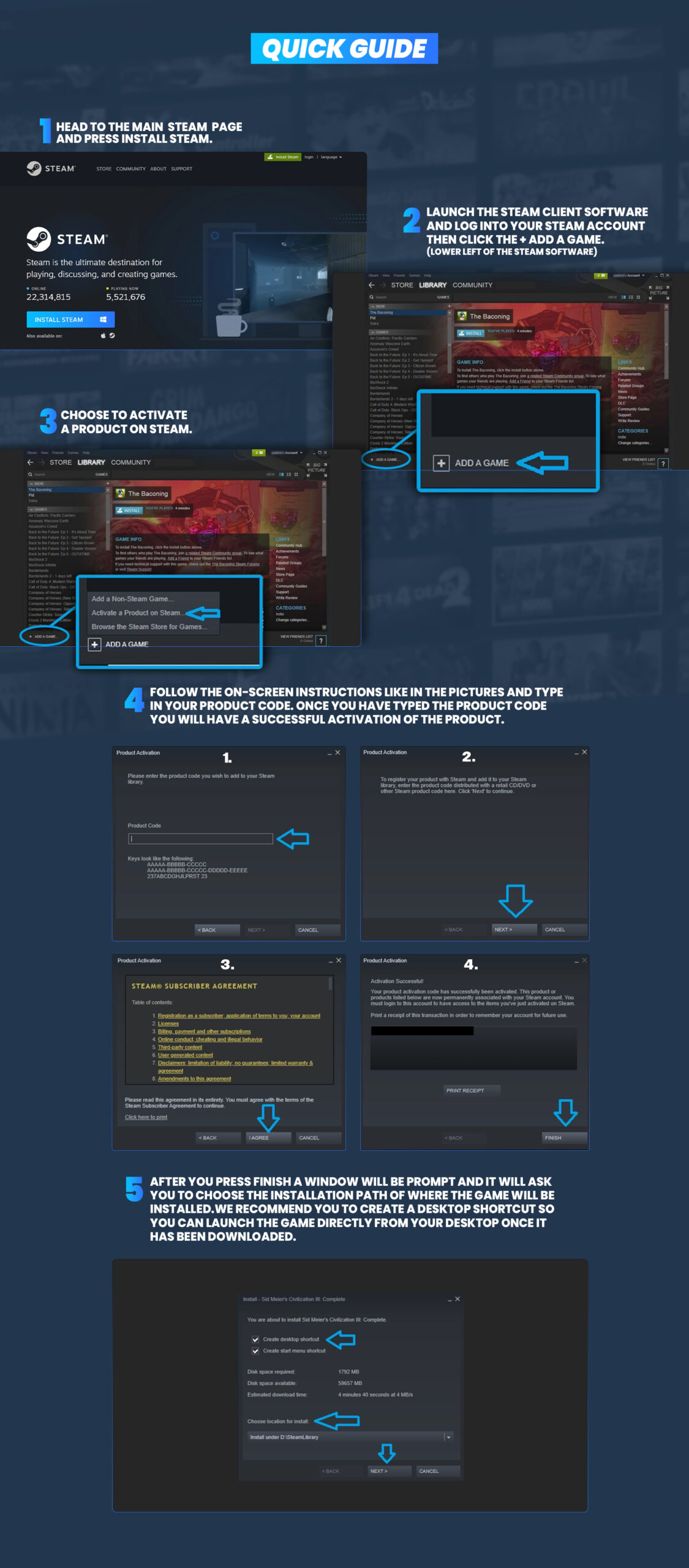
All you need to know to redeem Steam Keys, Wallet codes and Gift Cards on Steam
How to activate Wallet Codes or Gift Cards on PC?
Discounted Steam Wallet Codes and Gift Cards are a convenient way to add funds to your Steam Wallet. Redeem Wallet Codes or Gift Cards on your PC by following these steps.
How to activate Steam Keys, Wallet Codes and Gift Cards on Mobile?
You can also redeem both Steam Game Keys and Steam Wallet Gift Cards directly from your smartphone by following these steps.
How to activate Wallet Codes and Gift Cards on Steam Deck?
Steam Wallet Codes and Gift Cards can also be redeemed directly on your Steam Deck by following these steps.
Why is my Steam code not working?
You followed the step-by-step tutorial to activate your product key, but it’s not working? First, verify that you are entering a game key under Activate a Product on Steam (and not in the Steam Wallet Gift Card menu). Steam CD keys are typically 15 or 25 characters long, grouped by 5 and separated by dashes:
XXXXX-XXXXX-XXXXX or XXXXX-XXXXX-XXXXX-XXXXX-XXXXX
Make sure you didn’t forget any character, and differentiate similar digits and letters: 0 (zero) and O, Q and D, 1 and capital letter I, B and 8, G and 6. Also check the product region (e.g., Global, Europe, North America) before activating. Looking for more deals? Explore our best PC game deals and sales.
*If you need further assistance or have any other questions you can email us at support@allkeyshop.com and we will be more than happy to help you.









Comments (5)
Hi ! If i buy a key for steam PC will it work on mac os if the game is available on both platform in steam shop ? Or the bought key is only for pc ?
Hello Sam, If the game is compatible MAC on Steam it will work. The key is for the Steam platform so it is the same if it's on PC or MAC. Kind regards, Hakura Allkeyshop team
thanks for the help! i was looking for this like 50 minutes but now i figgured it out. im so very very very very very very very very very very very very very very very very veyr tahnksfull
Mi Key no funciona, intenté y steam no la acepta, ayuda.
Hello Wero, Have you tried contacting the store where you bought the game key? If not, we highly suggest that you proceed to their customer support page or live chat if it's available so they may assist you with this issue. If in any case the issue has not been solved, feel free to come back and contact us on our live chat so we can possibly help you further. Regards, Jay Allkeyshop Support Team